SEND Website Project
The Ambassador Volunteer Programme connects parent carers of children with SEND within their own communities and across Devon. Volunteers provide SEND information, peer support, and opportunities for families to influence how SEND services develop locally.
Key Features
- WordPress
- Kadence
- Password Protected Resources Area
- Embedded Google Map
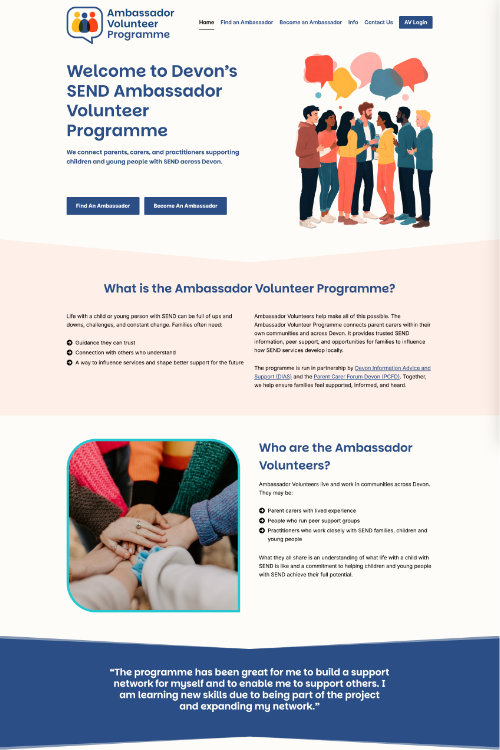
Good working relationships have a way of leading to more work. Having already built the website for Parent Carer Forum Devon, I was delighted when they came back to me with a new brief — this time for a partner project the Ambassador Volunteer Programme.
What is the Ambassador Volunteer Programme?
The Ambassador Volunteer Programme is a way for parents and carers of children with SEND to connect with volunteers who can help them get the most up to date information and support regarding SEND issues and help them access SEND services in Devon. The volunteers also help parents share their views about Devon services and support through the local Parent Carer Forum.
From a single page to a dedicated website
The programme is run in partnership by Devon Information Advice and Support (DIAS) and the Parent Carer Forum Devon (PCFD) and the only online presence the Ambassador Volunteer Programme had was a single page on the DIAS website, which told people what they were about, but not much else. The co-ordinator was keen to have their own dedicated webpage. They did also have a logo but the co-ordinator was keen to update and improve it and put a proper branding kit in place.
Having its own website gives the Programme its own identity. It strengthens their credibility with the volunteers and families alike and shows other SEND agencies and organisations the value of such a programme. With clear navigation and room to grow, the website can be much more useful to the volunteers who can quickly and easily access resources they need to do their job, and useful to families who want to connect with their local volunteer.
The client already had a good idea of what content she wanted to have on the new website and had it all ready before the design stage of the project. This helped me enormously with planning the site structure and navigation.
Designing the new logo and branding
The idea of the old logo was of lots of people connecting and talking with one another, illustrating the role of the volunteers and so the client was keen to keep this concept, particularly as the volunteers themselves had had input into it originally. I came up with 3 different variations of a possible new logo, each one retaining the idea of a speech bubble and people icons and the client picked my personal favourite.


In terms of the colour scheme I was briefed to stay away from green (which is PCFD’s colour scheme) so I ran with the yellow, blue and orange. Yellow and orange are warm and welcoming colours and blue signals professionalism.
The font I chose for the logo and headings is called Parkinsans Light. I liked how clear the font is to read whilst still being a little different from the norm. The body text font is called Inter. Accessibility is at the forefront of this project and therefore choosing readable fonts was crucial.
Helping families find an Ambassador: the interactive map
One of the main points of the website is for families to find their local ambassador to whom they can connect. The client chose to create a Google Map and add pins for the location of each ambassador. A map makes is much easier to find somebody than a list would.
No personal details are given for the ambassadors, so families must contact the Programme Co-ordinator if they wish to make contact. However it gives families an idea of where their nearest ambassador is.
The client can edit this map via her Google account and I simply embedded the map into a dedicated page.
A private space for volunteers
Another important feature for this site was to create a space whereby the volunteers could download resources to assist them with their work. These will typically be documents of various types such as PDFs, Word documents or PowerPoint files. This space is accessed from a link in the main menu so it’s easy for volunteers to find.
I installed a Download Library plugin to make it easy for my client to upload these resources and then displays them on the page in a neat, table format. This plugin is a free version of the Document Library plugin from Barn2. The free version is quite limited but was sufficient in this instance. I am a big fan of the Pro version of the plugin however. It’s by far the nicest download manager plugin to implement and for the client to use.
The page itself is password protected as the content is only for the volunteers. It wasn’t necessary for each volunteer to have their own individual usernames and password so I simply added a single password field to the page. The co-ordinator can send this password to whoever needs access and she can easily change it when necessary from the WordPress admin area.
The finished site
The client and I are delighted that the Ambassador Volunteer Programme now has its own digital home, rather than a single page on someone else’s website. We’ve given families an easy way to find an ambassador to help them and we’ve provided the ambassadors with easy access to the resources they need. The website is helping these two groups of people connect in a way that wasn’t available before and that makes me feel happy!